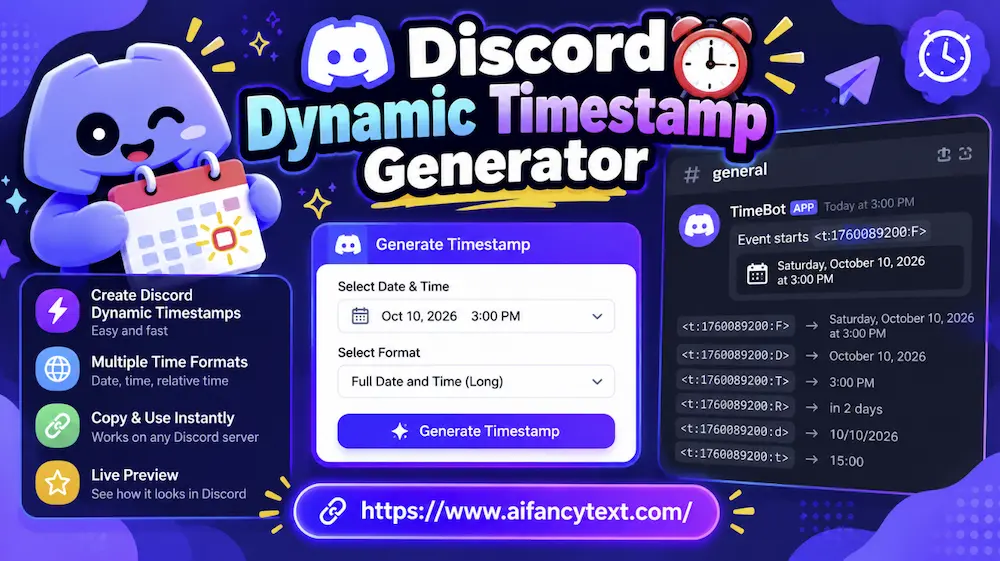
What is Discord Dynamic Timestamps?
If you manage a gaming clan, competitive esports team, streaming community, or global study server on Discord, you know the frustration of scheduling events across time zones. Announcing an event at "8:00 PM EST" requires international members in London, Berlin, Tokyo, and Sydney to manually convert the time—often leading to missed raids, empty giveaway check-ins, and daylight saving time blunders.
Discord solved this permanently with native dynamic timestamp tags. Instead of typing a static text time, you write a tag like <t:1775730600:R>. Discord automatically translates this into the exact local hour, calendar format, and language of whoever is reading the message.
How to Create a Discord Timestamp
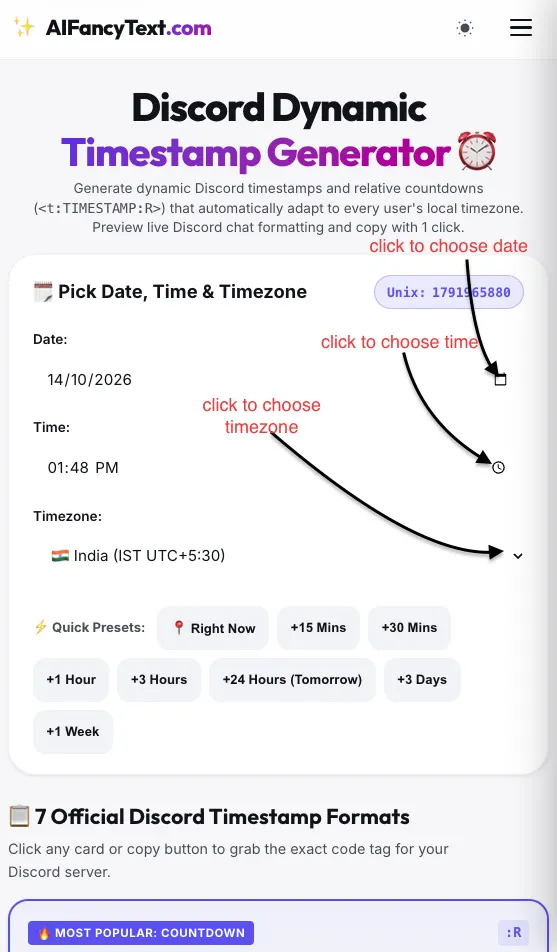
Creating a Discord timestamp is easy with our tool. You can choose a date, set a time, select a time zone, and generate a timestamp that displays the correct time for each person in your Discord server.
1. Choose a Date
First, find the date selection option. Click the calendar icon to open the date picker, then choose the date you want to share with others.
2. Choose a Time
Next, click the clock icon to select a time. You can choose the hour, minute, and AM or PM, depending on the time format available.
Make sure you select both the hour and minute so your timestamp shows the correct time.
3. Select Your Time Zone
After choosing the date and time, select your time zone from the list. You'll find time zones from different parts of the world.
For example, if you're in India, select Indian Standard Time (IST). Choosing the correct time zone helps the tool generate the right timestamp.
4. Generate and Copy Your Discord Timestamp
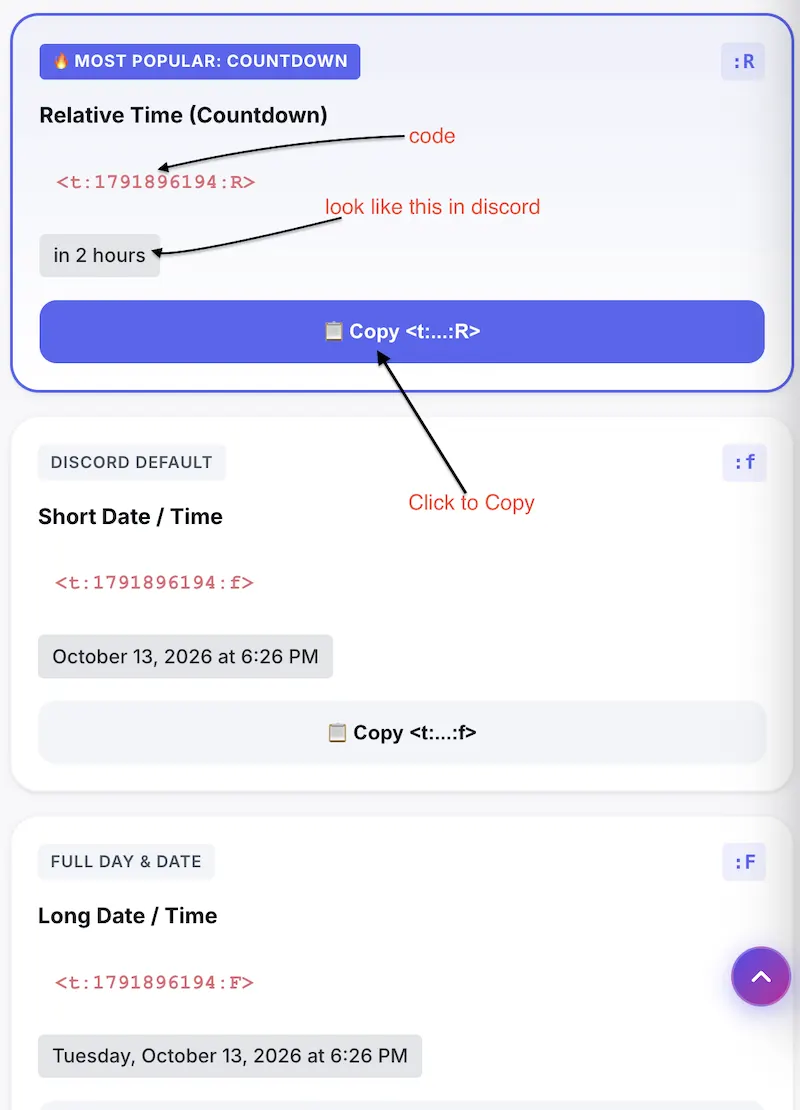
Once you've selected the date, time, and time zone, the tool will generate several Discord timestamp formats.
You'll see different options, such as short date, long date, short time, long time, and full date with time. Each format displays the date and time differently in Discord.
Choose the format you like and click its Copy button. A notification will appear to confirm that your timestamp has been copied.
5. Preview Your Timestamp
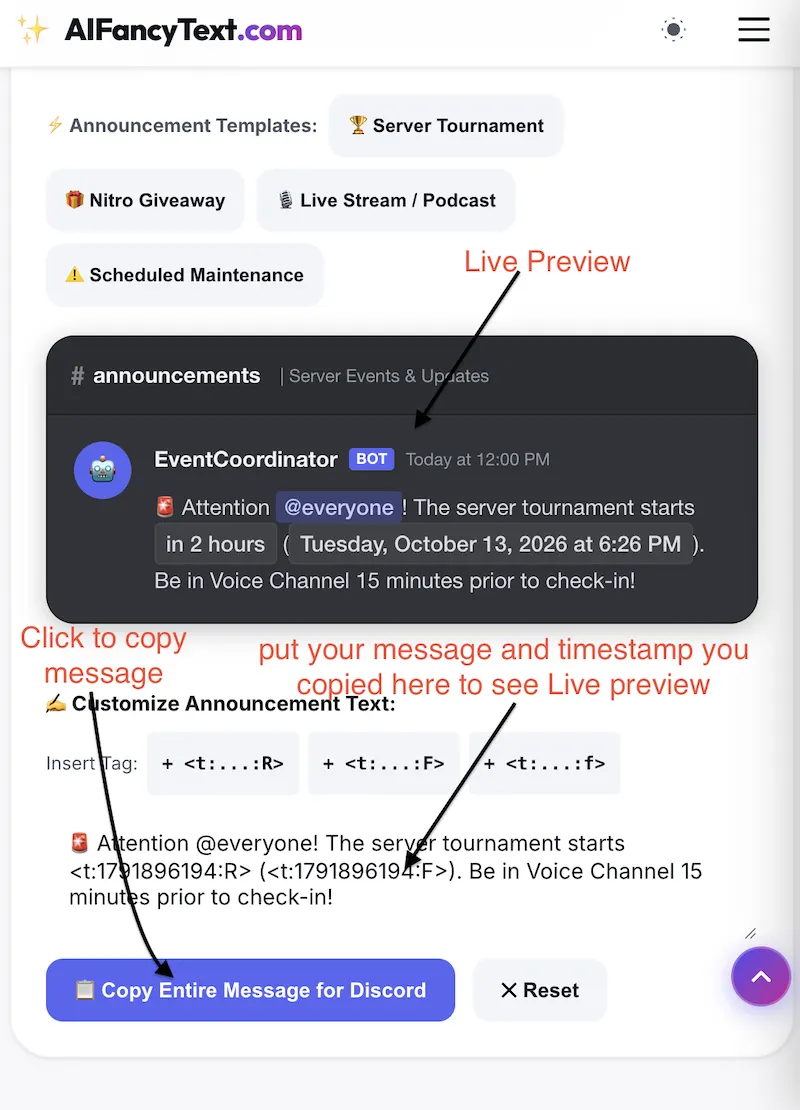
Want to see how your timestamp will look in Discord? Use the Discord chat simulator available on the website.
In the custom announcement text box, type your message and paste the timestamp you copied. The preview will show how your message and timestamp may appear in a Discord chat.
You can try different timestamp formats to find the one that works best for your message.
6. Use Your Timestamp in Discord
Once you're happy with the preview, copy your complete message and paste it into your Discord server or chat.
Discord will automatically display the timestamp according to each viewer's local time zone. This is especially useful for sharing event times, gaming sessions, meetings, and server announcements with people around the world.
That's it! You can now create, preview, and share Discord timestamps in just a few simple steps.
⚡ Key Advantages of Dynamic Discord Timestamps
- Zero Timezone Confusion: A member in New York sees "9:30 PM", a member in London sees "2:30 AM", and a member in Tokyo sees "10:30 AM"—all from the exact same message.
- Automatic Countdowns: Using the
:Rstyle generates a real-time countdown (e.g., "in 2 hours" or "15 minutes ago") that updates automatically inside the Discord client. - No Bots Required: Timestamps are a built-in feature of the official Discord API. Pair them with our Discord Font Styler to format colored messages and headers.
- Daylight Saving Proof: Because timestamps are stored as universal UTC Epoch seconds, seasonal clock shifts never break your scheduled raids or webinars.
How Discord Timestamps Work Under the Hood
Every Discord timestamp tag consists of three core components enclosed in angle brackets:
<t : [UNIX_EPOCH_SECONDS] : [FORMAT_FLAG]>
<t:— The opening delimiter that tells Discord's Markdown parser to treat this string as a temporal object.[UNIX_EPOCH_SECONDS]— The number of seconds elapsed since 00:00:00 UTC on January 1, 1970 (known as the Unix Epoch). For example,1775730600represents an exact instant in time.:[FORMAT_FLAG]>— An optional single-character flag specifying how the client should format the date or time on screen.
Discord Timestamp Format Flags Cheat Sheet
| Flag | Format Name | Syntax Example | Rendered Output (User View) | Best Use Case |
|---|---|---|---|---|
:R |
Relative Time | <t:1775730600:R> |
in 2 hours / 3 minutes ago | Event countdowns, giveaway deadlines, maintenance alerts. |
:f |
Short Date / Time | <t:1775730600:f> |
October 8, 2026 9:30 PM | Default Discord format. Balanced and clean for announcements. |
:F |
Long Date / Time | <t:1775730600:F> |
Thursday, October 8, 2026 9:30 PM | Formal tournaments, server rules, schedule calendars. |
:t |
Short Time | <t:1775730600:t> |
9:30 PM | Same-day reminders, meeting times, raid start hours. |
:T |
Long Time | <t:1775730600:T> |
9:30:00 PM | Speedruns, auction countdowns, high-precision events. |
:d |
Short Date | <t:1775730600:d> |
10/08/2026 | Compact lists, changelogs, ban logs. |
:D |
Long Date | <t:1775730600:D> |
October 8, 2026 | Product release dates, member anniversaries. |
How to Use Discord Timestamps in Bot Code (Python & JavaScript)
If you build custom Discord bots, you can easily generate dynamic timestamps programmatically:
import time
from datetime import datetime, timedelta

# Event scheduled 2 hours from now
event_time = datetime.now() + timedelta(hours=2)
epoch = int(event_time.timestamp())

# Send relative countdown in embed or channel
await channel.send(f"🚨 Tournament starts <t:{epoch}:R> (<t:{epoch}:F>)!")// In discord.js v14
const { time, TimestampStyles } = require('discord.js');
const targetDate = new Date(Date.now() + 2 * 60 * 60 * 1000);
const timestamp = Math.floor(targetDate.getTime() / 1000);
// Using built-in time helper or template literal
const formatted = `🎉 Giveaway ends !`;
await message.channel.send(formatted); Frequently Asked Questions
Can I use dynamic timestamps in Discord channel topics or server rules?
Yes! Discord dynamic timestamps work inside channel topics, server rules, embed fields, forum post titles, and user status bios. They render seamlessly on both desktop and mobile.
Why does my timestamp show as plain text instead of a pill?
Make sure you have formatted the tag correctly: it must start with <t:, followed by the integer timestamp in seconds (not milliseconds), an optional colon with the format flag, and a closing angle bracket >. Common mistakes include putting spaces inside the tag or providing a 13-digit millisecond timestamp instead of a 10-digit second timestamp.
What happens when a relative timestamp countdown expires?
When the target time is reached, the :R tag automatically flips from future to past tense without requiring any page reload. For example, "in 1 minute" changes to "just now", then "1 minute ago", and so forth.
Can regular Discord users send timestamp tags or is it bot-only?
Any Discord user can send timestamps! You do not need developer permissions, server administrator status, or a third-party bot. Just copy the tag from our tool and paste it directly into your chat box.