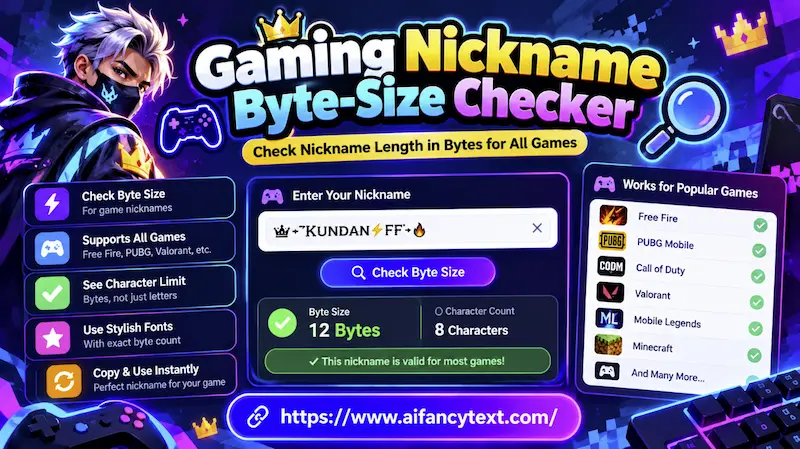
What Is a Gaming Nickname Byte Size Checker?
Every online gamer has encountered the frustrating "Nickname too long" error when trying to save a new in-game name (IGN). You count your letters, verify you are well under the allowed character limit, yet the game refuses to save your profile name.
If you play games like Free Fire, PUBG Mobile, BGMI, Call of Duty, or other multiplayer titles, this occurs because modern game engines validate name length in UTF-8 bytes rather than visual character count.
A Gaming Nickname Byte Size Checker solves this by measuring both the exact character length and byte weight in real time before you spend rename cards or diamonds in-game.
Why Can't You Save Your Gaming Nickname? (Characters vs. Bytes)
Let's take Free Fire as an example. Free Fire enforces a strict 12-byte limit on player signatures and IGNs.
If you enter a plain English name of 12 standard letters (like ShadowHunter), each ASCII
character consumes exactly 1 byte, totaling 12 bytes. It saves without any issues. However, the moment
you add wings (꧁༺...༻꧂), crowns (👑), Japanese kanji, or decorative symbols, each non-ASCII character
consumes between 3 to 4 bytes in memory.
Why does this happen?
The reason is how the game counts characters and it handles the data used to store your nickname. Some games enforce character limits, while others may also have restrictions related to the number of bytes or the types of characters you can use.
Understanding Gaming Nickname Limits: Characters vs. UTF-8 Bytes
When creating a unique gaming nickname or re-naming your account with a costly Name Change Card (such as the 390-Diamond card in Garena Free Fire), nothing is more frustrating than seeing the error: "Nickname cannot exceed 12 characters" or "Invalid Name". Understanding how modern game engines store and count text will save you diamonds, UC, and frustration.
Why Do Games Enforce Character & Byte Limits?
Online multiplayer games like Free Fire, Steam, PUBG Mobile, Valorant, and Roblox—rely on relational
databases (such as MySQL or PostgreSQL) and high-speed in-memory caches (such as Redis) to store
millions of player profiles. To optimize memory allocations in their C++, Unreal Engine, or Unity
network packets, game servers restrict player name columns to fixed-length strings (for example,
VARCHAR(12) or fixed 14-byte buffers).
| Game Platform | Max Character Limit | Byte / Engine Rule | Invisible Spaces Allowed? |
|---|---|---|---|
| Free Fire (Garena) | 12 characters | Visual grapheme / UTF-8 safe | ✅ Yes (U+3164 Hangul Space) |
| Steam Profile | 32 characters | UTF-8 text string | ✅ Yes (Supports most Unicode) |
| PUBG Mobile / BGMI | 14 characters | Strict byte limit buffer | ✅ Yes (Single U+3164 space) |
| Valorant (Riot ID) | 16 characters (+5 tag) | Alphanumeric + Letters | ❌ No (Standard spaces only) |
| Roblox Username | 20 characters (min 3) | Alphanumeric & single _ |
❌ No special symbols |
| Discord Display Name | 32 characters | Full Unicode support | ✅ Yes |
| Call of Duty (Activision) | 16 characters | Letters, digits, symbols | ⚠️ Limited symbols |
| Minecraft Java | 16 characters (min 3) | A-Z, 0-9, and underscores | ❌ Strict ASCII only |
What Is the Difference Between Characters and Bytes?
Before using the tool, let's understand the difference between a character and a byte.
A character is what you see when you type a letter, number, or symbol. A byte is a unit of digital information used to represent data.
For example, in standard UTF-8 text:
- The letter
Auses 1 byte. - The number
5uses 1 byte. - A normal space uses 1 byte.
- Many special symbols and emojis use more than 1 byte.
This means that one visible character does not always occupy just one byte.
For example, you might copy a special badge symbol that looks like a single character. However, that symbol could use multiple bytes when represented in UTF-8.
As a result, your nickname might contain 11 visible characters but require 13 bytes or more.
If you only count the characters, you might think your nickname is within the game's limit. However, if the game also enforces a byte limit, the nickname could be rejected.
Important: A larger byte size does not automatically mean that your nickname will be rejected. It depends on the rules and technical implementation of the particular game.
Do All Online Games Have a Byte Limit?
No. Different games can use different rules to validate nicknames.
Some games primarily enforce a character limit. Others may also check byte length, supported Unicode characters, or other restrictions.
For example, if a game allows 12 characters, a nickname containing 12 accepted characters might be valid even if its UTF-8 byte size is greater than 12.
However, if the game also enforces a separate byte limit, the same nickname might not be accepted.
Fancy letters, emojis, badges, and decorative symbols can make this more complicated because their appearance does not always tell you how the game counts or processes them.
Therefore, you should check both the character count and byte size when creating a gaming nickname, especially if you want to use special symbols.
How to Use the Gaming Nickname Byte Size Checker
Using the Gaming Nickname Byte Size Checker is simple. Follow these steps to check your nickname before using it in a game.
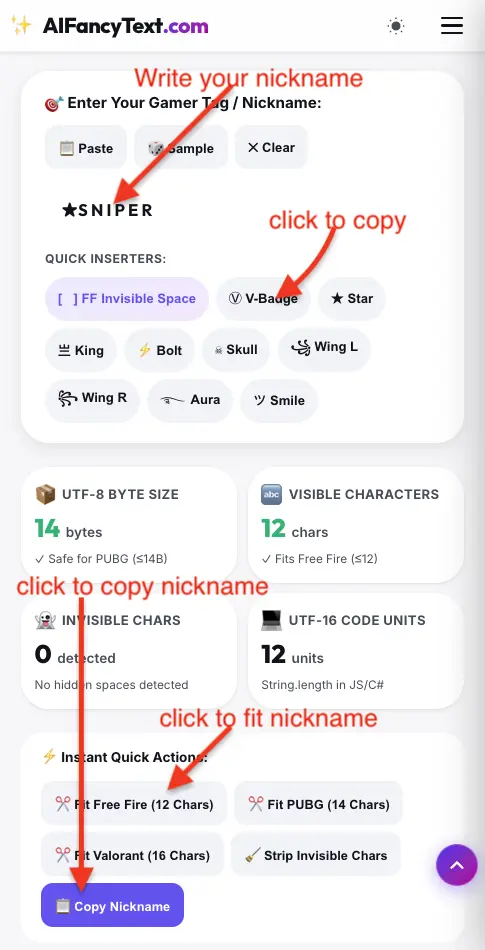
Step 1: Enter Your Gaming Nickname
First, type or paste your gaming nickname into the input box.
For example, you can enter your existing nickname or create a new name using letters, numbers, and special symbols.
As you enter your name, the tool displays information about it so you can understand how it is counted.
Step 2: Check the Character Count and Byte Size
After entering your nickname, look at the information displayed by the tool.
You can check details such as:
- Character Count: The number of characters in your nickname, according to the tool's counting method.
- Byte Size: The amount of data used to represent your nickname in the selected encoding, such as UTF-8.
- Visual Characters: The number of visible text units, which may differ from the number of underlying Unicode characters.
- Code Units: The number of encoding units used to represent the text in a particular format, such as UTF-16.
These measurements help you understand why a nickname containing emojis or decorative symbols may behave differently from one containing only ordinary letters.
Step 3: Add Special Symbols and Decorations
The tool also provides quick-insert options to help you customize your nickname.
Depending on the available options, you can add badges, stars, decorative symbols, bold-style text, wings, and smiley faces.
You can combine these elements to create a unique gaming name and check how the character count and byte size change as you edit it.
Step 4: Check Your Nickname Against Game Limits
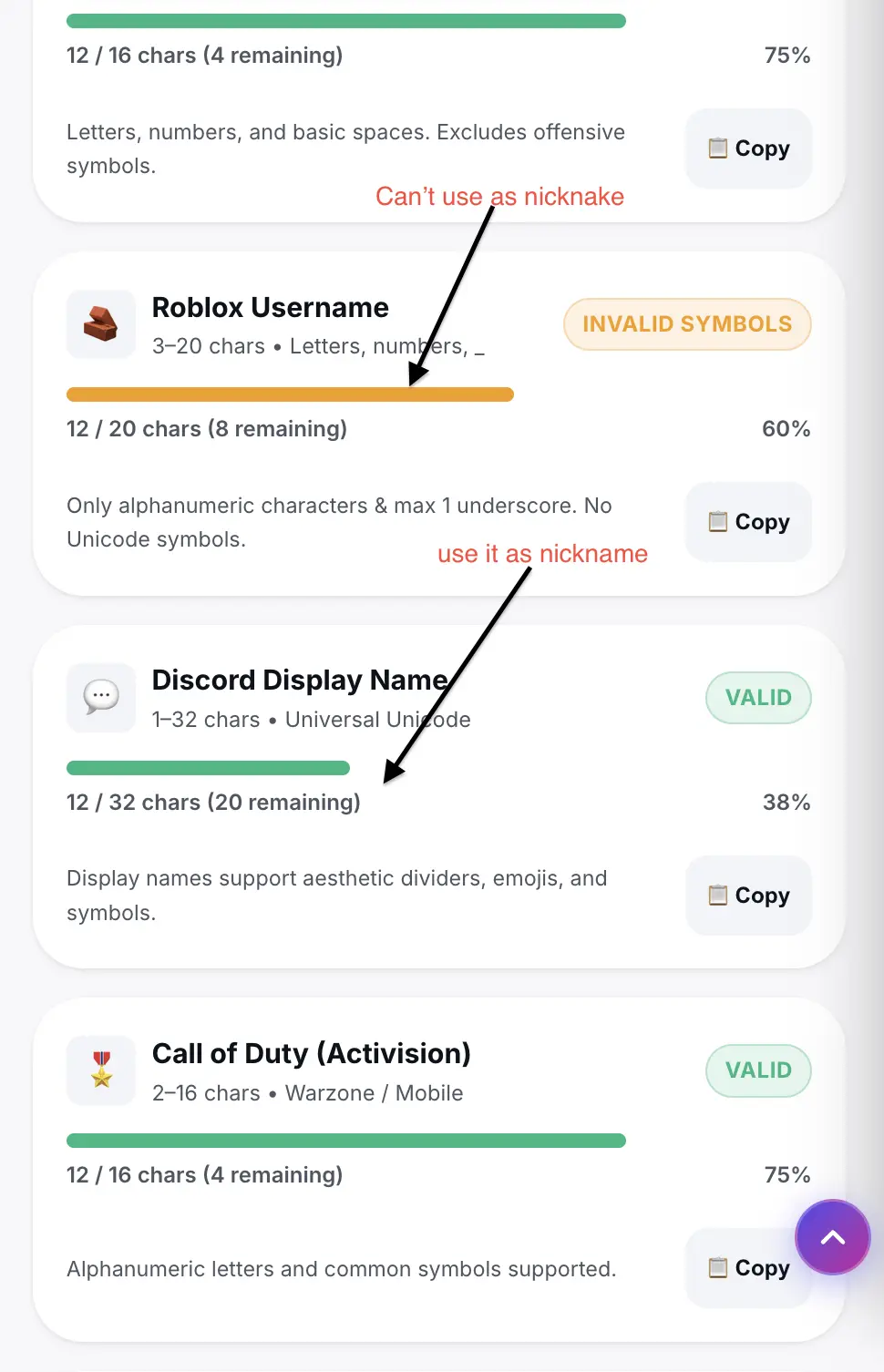
Below the nickname editor, you can find information about character limits for different games.
Choose the game you want to use your nickname in and check the compatibility results provided by the tool.
This helps you identify whether your nickname appears to fit the selected game's limits.
Keep in mind that the result is an estimate based on the tool's rules and available information. A game may also reject certain symbols, unsupported characters, or formatting that the checker cannot fully reproduce.
Step 5: Understand the Compatibility Colors
The compatibility section uses colors to help you understand the results quickly.
- Green — Valid: Your nickname appears to meet the checked requirements.
- Yellow — Caution: Some symbols or characters may not be supported, may display incorrectly, or may be rejected by the game.
- Red — Invalid: Your nickname exceeds a checked limit or fails a validation rule.
These colors help you identify potential problems before copying your name into the game. However, a green result cannot guarantee that every symbol will work in every game version.
Step 6: Copy Your Gaming Nickname
Once you are satisfied with your nickname, click the Copy button to copy it.
Then open your game, go to the nickname or username editing section, and paste your name.
If the game does not accept it, try removing some emojis or decorative symbols and check the nickname again.
Create a Gaming Nickname That Works
A gaming nickname can look simple on your screen while containing complex characters behind the scenes. This is why counting visible characters alone may not always explain why a game rejects a name.
The Gaming Nickname Byte Size Checker helps you examine your nickname's character count, byte size, and other text information. It also lets you explore decorative symbols and compare your name against available game limits.
Before using a fancy nickname in Free Fire, PUBG, Call of Duty, or another online game, check the results and simplify your name if necessary.
This way, you can spend less time troubleshooting your nickname and more time enjoying your game.
How Do Invisible Spaces and Fancy Symbols Affect Character Count?
Many players ask: "Does the Free Fire invisible space (ㅤ) count as a character?" The answer is an absolute yes. The invisible character is not a standard space (ASCII 32); it is the Unicode character Hangul Filler (U+3164). Although it leaves a blank gap in your nickname, the Free Fire server reads it as 1 character and allocates 3 UTF-8 bytes to it. If your name contains two invisible spaces, you only have 10 visible characters left for your letters and symbols! You can style the remaining characters using our Gaming Nickname Generator or add Free Fire Bio Color Codes.
Always test your Free Fire nickname in this checker before buying or confirming a Name Change Card. If your name says 13/12 characters, simply click the "✂️ Fit Free Fire (12 Chars)" button above to automatically truncate or balance your clan tag and symbols to fit the 12-character limit perfectly!
Frequently Asked Questions (FAQ)
What is the Free Fire nickname 12 character limit?
Garena Free Fire strictly restricts player In-Game Names (IGN) to a maximum of 12 characters. If your name exceeds 12 characters, the game will prevent you from saving the name or waste your Name Change Card (390 Diamonds). Because invisible spaces (like Hangul Filler U+3164) and special symbols count as characters, always check your nickname with this tool first.
Why does a game reject my nickname even if it looks short?
Many gaming servers calculate name length by UTF-8 byte size rather than visual character count. Standard English letters (A-Z) consume 1 byte each, but fancy Unicode symbols, Japanese kanji, and Korean spaces take 3 bytes each, while emojis take 4 bytes. If a game has a 14-byte limit like PUBG Mobile, a 5-letter name with two 4-byte emojis will total 13 bytes, leaving very little room.
What is the Steam name length limit?
Steam allows profile names between 2 and 32 characters in length. While Steam supports most Unicode symbols and emojis, names exceeding 32 characters will be automatically truncated or rejected when saving profile settings.
Does the Free Fire invisible space (ㅤ) count towards the 12-character limit?
Yes! The popular invisible space used in Free Fire nicknames is the Unicode character Hangul Filler (U+3164). Although it renders as blank space in-game, Garena treats it as exactly 1 character (and 3 UTF-8 bytes). If you insert two invisible spaces, you only have 10 character slots remaining for your letters.
What are the nickname limits for PUBG Mobile, Valorant, and Roblox?
PUBG Mobile / BGMI limits names to 14 characters/bytes. Valorant Riot IDs allow 3 to 16 characters for the game name (plus 3-5 characters for the tagline). Roblox usernames must be between 3 and 20 characters and only permit letters, numbers, and a single underscore.