1. Instant Fancy Fonts & Aesthetic Text Styles (100+ Variations)
No waiting. Text converts as you type.
Everything runs in your browser. No server uploads.
Mobile, Tablet, Desktop. iOS & Android compatible.
From Cursive to Cyberpunk, we have it all.
2. How Does the Fancy Text Generator Work? (Unicode vs. Graphic Fonts)
Fancy font generator (also known as a fancy text generator) is a free online text generator (typography converter) that instantly converts ordinary norma text (keyboard or keypad typed text) into over 100+ stylish Unicode fonts, aesthetic symbols, and pro gaming nicknames that can be copied and pasted anywhere online. Instead of creating rasterized images or requiring custom font installations (such as.TTF or
.OTF files), the generator maps standard ASCII characters to international
Unicode Mathematical Alphanumeric Symbols (spanning code points
U+1D400 through U+1D7FF), Enclosed Alphanumerics, and combining symbol
blocks.
Because these decorative characters are an integral part of the global Unicode standard, they render
natively across Instagram bios, TikTok captions, Discord servers, WhatsApp chats, X (Twitter), and
competitive mobile game profiles (including Free Fire MAX, BGMI, Call of Duty: Mobile, and Roblox)
with zero third-party software required. To use it, simply type or paste your phrase into the
generator input box above, browse through 100+ unique font variations—including Royal Cursive, Small
Caps, and tap to Copy or Click On Fancy Text you like to Copy.
Why Unicode Renders Across All Devices (Unicode vs. Graphic Fonts)
It is one the question many people would have, why it renders all devices? Standard computer keyboards only produce 128 basic ASCII characters (such as standard English letters A–Z and numbers 0–9). However, the Unicode Consortium developed an international encoding standard indexing over 149,000 unique characters across modern and historic writing systems. Our fancy font generator leverages specialized Unicode character blocks to achieve distinct typographic aesthetics:- Mathematical Alphanumeric Symbols (
U+1D400–U+1D7FF): Supplies complete alphabets of styled letters originally designated for scientific and mathematical notation, including Bold Sans (𝗙𝗮𝗻𝗰𝘆), Bold Serif (𝐅𝐚𝐧𝐜𝐲), Cursive Script (𝓕𝓪𝓷𝓬𝔂), Fraktur Gothic (𝕱𝖆𝖓𝖈𝖞), Double-Struck (𝔽𝕒𝕟𝕔𝕪), and Monospace (𝙵𝚊𝚗𝚌𝚢). - Phonetic Extensions (
U+1D00–U+1D7F): Encodes linguistic small capitals (ꜰᴀɴᴄʏ ᴛᴇxᴛ) that scale capital letterforms down to lowercase x-height. - Enclosed Alphanumerics (
U+2460–U+24FF): Supplies circled bubble letters (Ⓕⓐⓝⓒⓨ) and negative squared letters (🅕🅐🅝🅒🅨). - Combining Diacritical Marks (
U+0300–U+036F): Dynamically stacks vertical glitch accents for Zalgo text (F̷a̷n̷c̷y̷) or horizontal strikethrough (F̶a̶n̶c̶y̶).
3. Popular Font Categories: Cursive, Gothic, Small Caps & Gaming
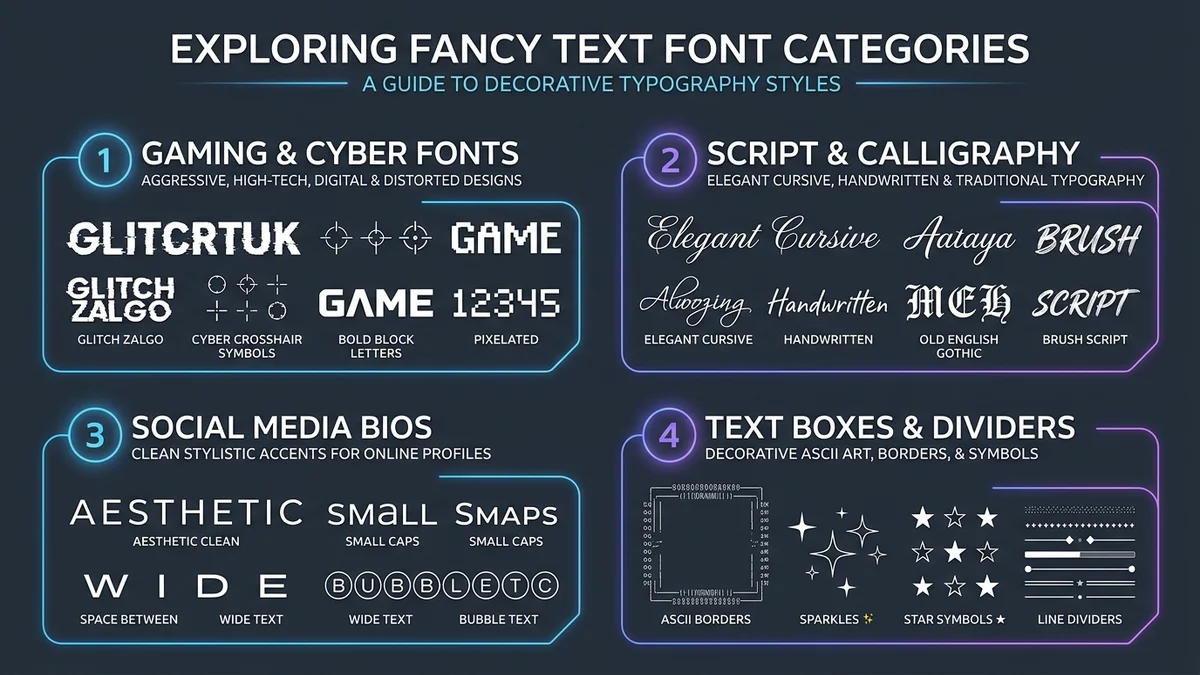
- Script & Calligraphy: Its best use case with Generate flowing handwriting with our Cursive Font Generator.
- Gothic & Medieval: Command attention with heavy Fraktur on our Old English Font Generator.
- Bold & Aesthetic Clean: Boost legibility with our, Small Caps Generator
- Gaming & Glitch Fonts: Use it to forge lethal handles with our Gaming Nickname Generator, and distorted Zalgo Text Generator.
- Borders, Symbols & Utilities: Decorate bios and display name using our Text Box Generator, Aesthetic Text Dividers, Cool Text Symbols, Decorative Text, Invisible Character (U+3164), Upside Down Text, and Strikethrough Text.
- Specialized Gaming & Bio Tools: Explore the AI Bio Generator, Instagram Bio Studio, TikTok Bio & Font Generator, Free Fire Bio Colors, Gaming Name Byte Checker, Words to Minutes Calculator, and NATO Phonetic Translator.
| Category / Style | Live Preview | Primary Unicode Range | Best Use Case |
|---|---|---|---|
| Heavy Sans Bold | 𝗙𝗮𝗻𝗰𝘆 𝗧𝗲𝘅𝘁 | U+1D5D4–U+1D607 |
Esports Clan Tags & Kill-Feed Visibility |
| Bold Gothic Fraktur | 𝕱𝖆𝖓𝖈𝖞 𝕿𝖊𝖝𝖙 | U+1D56C–U+1D59F |
Medieval Handles, COD:M & Discord Roles |
| Royal Cursive Script | 𝓕𝓪𝓷𝓬𝔂 𝓣𝓮𝔁𝓽 | U+1D4D0–U+1D503 |
Instagram Bios, Quotes & Streamer Names |
| Pro Gamer Wings | ꧁༺ 𝕱𝖆𝖓𝖈𝖞 𝕿𝖊𝖝𝖙 ༻꧂ | Tibetan Brackets (U+0F04) |
Free Fire MAX & BGMI Nicknames |
| Cute Ribbon Bows | ୨୧ ₊˚⊹ ꜰᴀɴᴄʏ ᴛᴇxᴛ ⊹˚₊ ୨୧ | Phonetic Small Caps + Symbols | TikTok Captions & Aesthetic Bios |
| Glitch Zalgo | F̷a̷n̷c̷y̷ ̷T̷e̷x̷t̷ | Combining Diacriticals (U+0336) |
Cyberpunk Themes & Creepypasta Chats |
Pro Gaming Fonts for Mobile Gamers
Whether you are leading an esports squad in Free Fire MAX, climbing the conqueror tier in BGMI (Battlegrounds Mobile India), dominating ranked matches in Call of Duty: Mobile (CODM), or customizing your Discord, Brawl Stars, and Roblox player identity, your in-game name (IGN) is your calling card. Standard plain text gets lost in the kill-feed. Our generator equips you with the most popular combat-tested gaming styles:High-visibility sans bold (𝗙𝗮𝗻𝗰𝘆 𝗧𝗲𝘅𝘁) and bold serif (𝐅𝐚𝐧𝐜𝐲 𝐓𝐞𝐱𝐭) designed for esports teams, clan prefixes, and crisp kill-feed readability.
Intimidating Old English and Bold Fraktur (𝕱𝖆𝖓𝖈𝖞 𝕿𝖊𝖝𝖙) with dark knight shields and cross symbols for fearsome combat handles.
Sleek, elite calligraphy (𝓕𝓪𝓷𝓬𝔂 𝓣𝓮𝔁𝓽) tailored for verified content creators, streamers, and signature gamertags.
Top trending gaming symbols: Boss King (亗), Ninja Wings (꧁༺ ༻꧂), Sniper Rifle (︻╦╤─), and Ghost Dead (×͜×).
Popular Gamer Examples: Transform Your In-Game Name
See how a simple nickname like "Dark Knight" transforms into combat-ready gamer styles:Mobile Gaming Name Guidelines & Byte Limits
Before you spend valuable in-game diamonds or rename cards, keep these platform-specific character and byte limits in mind:- Free Fire / Free Fire MAX: Maximum 12 characters. Complex Unicode symbols often take 2 to 4 bytes in the game engine. Always test your name length first.
- BGMI & PUBG Mobile: Maximum 14 characters. Certain special symbols like 亗 and 『』 are fully supported in season rename cards.
- Call of Duty: Mobile (CODM): Maximum 14 characters. Bold alphanumeric Unicode characters render cleanly across tournament streams.
- Discord & Roblox: Up to 32 characters for server nicknames, with full support for Gothic Fraktur, monospace, and brackets.
Accessibility Considerations and Best Practices
While fancy fonts add immense personality to profiles and gamertags, applying them thoughtfully ensures complete digital accessibility and seamless readability:- Screen Reader Interaction: Assistive screen readers (such as Apple VoiceOver, NVDA, and Android TalkBack) pronounce Mathematical Alphanumeric Symbols literally as math glyphs (e.g., reading 𝗙 as "Mathematical Sans-Bold Capital F"). Use fancy fonts primarily for names, display headers, clan tags, and decorative phrases rather than long blocks of essential text or URLs.
- Search Engine & Platform Discovery: If you are optimizing a brand or creator account on Instagram or TikTok, keep your core searchable keywords in standard Latin text in your name or handle so platform search engines can discover your profile effortlessly.
- Device Legibility: High-contrast styles like Heavy Sans Bold and Small Caps maintain crisp legibility on small smartphone viewports and low-resolution displays.
Personalize: Save Favorites & Dark Mode
Found a font combination you love? Tap the Heart (🤍) button beside any card to save it into your personal Favorites collection so you never lose your best tags when you see heart become red heart symbol it means it is saved in Favorites. Tired of bright screens during late-night gaming sessions? Tap the Sun / Moon toggle in the top-right corner to switch effortlessly between ultra-sleek Dark Mode and clean Light Mode.4. Step-by-Step Guide: How to Copy and Paste Fancy Text Anywhere
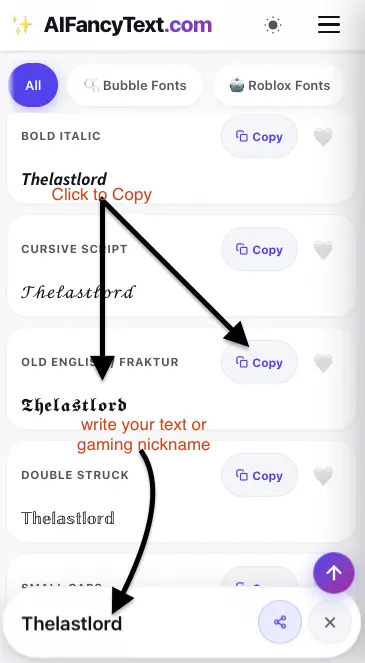
- Enter Your Text or Gamertag: Type or paste your name, social handle, clan tag, or bio into the live input box at the top of the page.
- Explore Real-Time Previews (100+ Styles): As you type, the engine dynamically converts your text into over 100+ fancy text styles organized by category—from pro esports symbols to romantic cursive and aesthetic ribbons.
- 1-Tap Copy & Paste: Click on any fancy text style you like or tap the Copy button on any text styles. As you click, you will see toast confirms your fancy text is copied to the clipboard. Paste it directly into your game profile, social media bio, or chat app.
5. Platform Compatibility: Instagram, TikTok, Discord & WhatsApp
Because our text generator outputs standardized Unicode characters rather than proprietary font files, styles render reliably across major mobile ecosystems and social networks. Review platform rendering support below:| Platform / App | Bio / Nickname Support | Post / Chat Compatibility | Recommended Font Styles | Key Platform Notes |
|---|---|---|---|---|
| ✅ 100% (Name & Bio) | ✅ Full (Captions & Comments) | Cursive Script, Bold, Small Caps | Keep handle (@) plain; use fonts in display name and bio lines. | |
| TikTok | ✅ 100% (Profile Display Name) | ✅ Full (Video Captions & DMs) | Small Caps, Cute Dividers, Sans Bold | 80-character bio limit. Pair with cool symbols. |
| Discord | ✅ 100% (Server Nicknames) | ✅ Full (Chat, Markdown & Status) | Gothic Fraktur, Text Boxes, Glitch Zalgo | Combine with code block syntax for highlighted text boxes. |
| ✅ 100% (About & Profile Name) | ✅ Full (Messages & Status Stories) | Bubble Fonts, Wide Text, Heavy Bold | Renders natively across iOS and Android without third-party keyboards. | |
| Free Fire MAX / BGMI | ✅ Supported (Rename Cards) | ✅ Clan Tags & Signatures | Boss King (亗), Sniper Emblems, Ninja Wings | Check 12–14 byte limits using Name Byte Checker. |
| Twitter / X | ✅ 100% (Display Name & Bio) | ✅ Full (Tweets & Replies) | Italics, Strikethrough,Bold Sans | Search algorithms favor standard text for primary handles. |