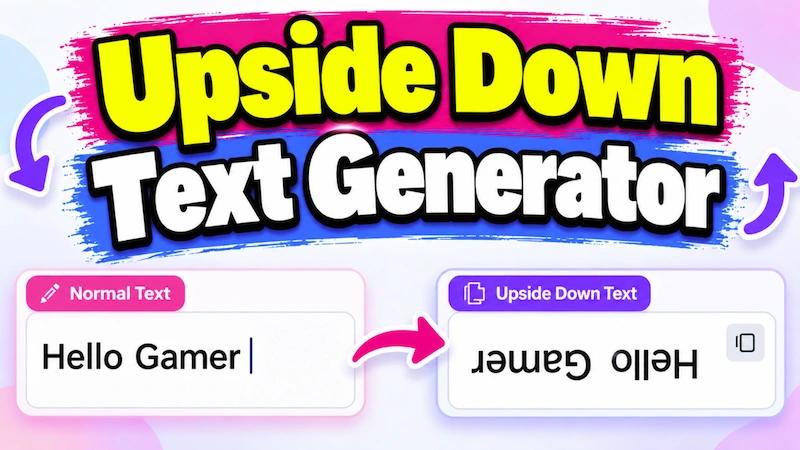
What Is Upside Down Text Generator and How Does Flipping Work?
Upside down text generator, also known as a flip text generator, is an online tool that converts normal text into upside down, flipped, or reversed text. It makes your messages look different and adds a creative touch to your writing.
The tool offers several text styles, including upside down text, backward text, mirror reflection text, and decorative flip text. Each style transforms your original message in a different way.
Upside Down Text Generator Use It to Impress Friends and Family
Want to confuse your friends, create an unreadable secret status, or craft a funny tweet that forces everyone to turn their phone upside down? Our Upside Down Text Generator takes any standard text you type and instantly inverts it 180 degrees into uʍop ǝpᴉsdn ʇxǝʇ.
Unlike basic photo editors that rotate text as an image, this tool generates real, selectable Unicode characters. This means you can copy the flipped output and paste it anywhere plain text is accepted — including Discord nicknames, Instagram bios, TikTok comments, WhatsApp chats, and Twitter/X handles.
How Upside Down Text Works (Unicode vs CSS)
| Original Latin | Inverted Glyph | Unicode Name & Code Point |
|---|---|---|
| a, b, c, d, e | ɐ, q, ɔ, p, ǝ | Turned A (U+0250), Q (U+0071), Open O (U+0254) |
| f, g, h, i, j | ɟ, ƃ, ɥ, ᴉ, ɾ | Dotless J (U+027E), Turned H (U+0265) |
| k, l, m, n, o | ʞ, l, ɯ, u, o | Turned K (U+029E), Turned M (U+026F) |
| p, q, r, s, t | d, b, ɹ, s, ʇ | Turned R (U+0279), Turned T (U+0287) |
| u, v, w, x, y, z | n, ʌ, ʍ, x, ʎ, z | Turned V (U+028C), Turned W (U+028D), Turned Y (U+028E) |
In web development, you can rotate text on a website using CSS code such as
transform: rotate(180deg);.
However, when you attempt to copy CSS-rotated text into Instagram or WhatsApp, it pastes right-side up
because CSS
only alters visual rendering on that specific web page.
Our Upside Down Generator solves this by mapping each Latin alphabet letter to a corresponding upside-down Unicode character. For example:
- The letter
ais converted intoɐ(Latin Small Letter Turned A,U+0250). - The letter
eis converted intoǝ(Latin Small Letter Turned E,U+01DD). - The letter
tis converted intoʇ(Latin Small Letter Turned T,U+0287). - The question mark
?is converted into¿(Inverted Question Mark,U+00BF).
Finally, the generator reverses the entire string order from left to right. When someone rotates their phone 180 degrees, the words read from left to right normally!
The 3 Ways to Invert Text: 180° Flip vs Backwards vs Mirror
Our generator provides three distinct styles of text manipulation:
- 180° Flipped Upside Down (uʍop ǝpᴉsdn): Rotates each individual character and reverses the word sequence. When physically flipped, it reads right-side up.
- Backwards / Reverse Text (txet drawkcaB): Reverses the letter sequence without inverting individual characters. Great for word puzzles and mirror reading.
- Mirror Text (ɈxɘɈ boɿoɿɿiM): Reflects letters horizontally along the vertical axis, resembling text seen in a mirror.
Upside Down Character Conversion Table
| Original | 180° Flipped | Backwards (Reverse) | Mirrored |
|---|---|---|---|
| Hello World | pןɹoM oןןǝH | dlroW olleH | blɿoW ollɘH |
| Flip the table! | ¡ǝןqɐʇ ǝɥʇ dᴉןℲ | !elbat eht pilF | !ɘldɒƚ ɘʜƚ qilꟻ |
| Numbers 1 2 3 4 5 | ϛ ㄣ Ɛ ᄅ Ɩ sɹǝqɯnN | 5 4 3 2 1 srebmuN | 5 4 3 2 1 ᴎɘdmυᴎ |
| Why are you upside down? | ¿uʍop ǝpᴉsdn noʎ ǝɹɐ ʎɥM | ?nwod edispu uoy era yhW | ?ᴎwob ɘbiƨqu υoy ɘɿɒ γʜW |
Popular Uses for Upside Down Text
- Discord Server Nicknames & Roles: Invert your username to stand out at the top of server member lists.
- Twitter & Threads Mystery Posts: Post upside-down teaser tweets that make followers stop scrolling and rotate their screens.
- Gamer Clan Tags (Roblox, Steam, PUBG): Create memorable inverted tags like
(╯°□°)╯︵ uʍop ǝpᴉsdn. - Encrypted Spoilers & Puzzle Clues: Write riddle answers upside down so readers aren't accidentally spoiled.
- Instagram Bio & Caption Jokes: Add humor to your profile with inverted quotes and table-flip emoji combos.
Different Types of Upside Down Text Styles
Here, we have added few of text styles that you are going to see in this page that is focused on upside down text.
Upside Down Text: This style turns your text upside down by replacing normal letters with characters that resemble rotated versions of the original letters.
Backward or Reverse Text: This style reverses the order of your text, making it read from right to left instead of the usual left to right.
Mirror Reflection Text: This style creates text that resembles a mirror reflection. The letters are transformed to give your message a mirrored appearance.
Upside Down Left-to-Right Text: This style combines an upside down appearance with the usual left-to-right text order, creating a unique visual effect.
Emoji Flip Text: This style combines flipped text with emojis or decorative symbols to make your message more playful and interesting.
Decorative Flip Text: Some styles add stars, special characters, gaming symbols, and other decorative elements to your flipped text. These options help you create unique messages for social media, chats, and profiles.
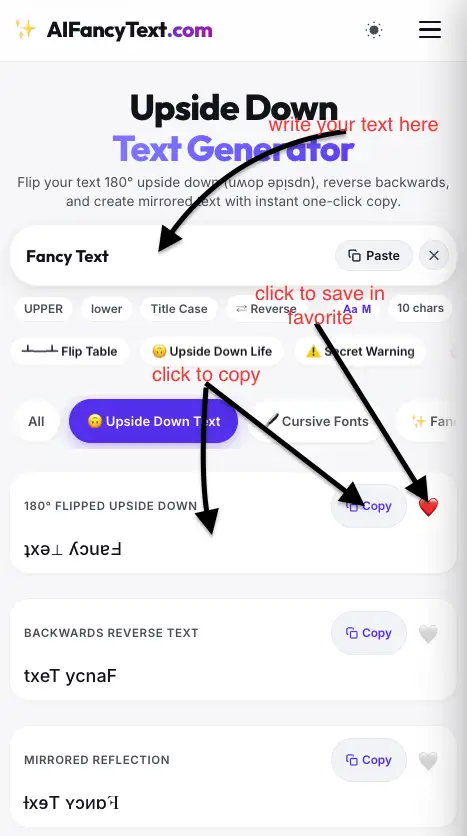
How to Use the Upside Down Text Generator
Using the upside down text generator is simple. First, enter your name, nickname, message, or any other text in the input box. As you type, the tool automatically generates different flipped and reversed text styles.
Browse the available results and choose the style you like. You can click the generated text or use its corresponding Copy button to copy it to your clipboard.
Once copied, you can paste the text into social media posts, messaging apps, profile descriptions, or anywhere else you want to use it.
How to Save Your Favorite Text Styles
If you find a text style you like and want to use it later, click the heart icon next to that style. When the heart icon turns red, it indicates that the style has been added to your favorites.
This feature makes it easy to save your preferred text styles and access them again whenever you need them.
Frequently Asked Questions (FAQ)
What is an upside down text generator?
An upside down text generator is a free tool that converts standard keyboard letters into flipped Unicode characters and reverses their order so that the entire sentence appears rotated 180 degrees.
Why can I copy and paste upside down text anywhere?
Because the generator uses real characters from the international Unicode Standard, not image files or CSS tricks. All modern operating systems (iOS, Android, Windows, Mac) support these symbols natively.
Can I use upside down text on mobile keyboards?
Yes. Simply type your message into the box on this page, click the "Copy" button, and paste it into any text box on your phone keyboard.
How do I turn upside down text right-side up?
You can paste the upside-down text back into our input box, and our algorithm will reverse and un-flip the characters back into standard English letters.
Is this upside down text generator completely free?
Yes, 100% free with unlimited conversions, zero ads blocking your typing, and instant 1-tap clipboard copying.